


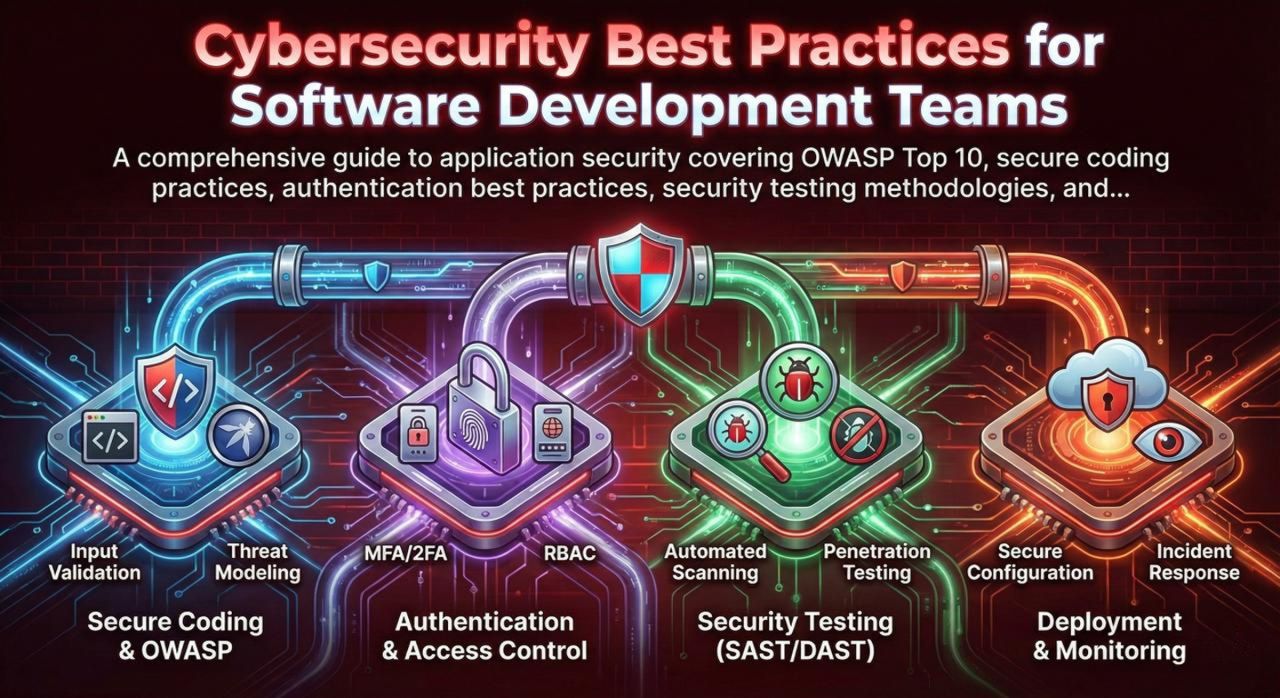
In 2024, the average cost of a data breach reached $4.88 million globally. For software development teams, security is no longer optional—it's a fundamental requirement that must be woven into every stage of the development lifecycle. This guide provides actionable security practices that every development team should implement, from secure coding fundamentals to advanced threat modeling and penetration testing.
The OWASP Top 10: Understanding Critical Vulnerabilities
The OWASP Top 10 represents the most critical security risks to web applications. Every developer should understand these vulnerabilities and how to prevent them.
| # | Vulnerability | Description | Prevention |
|---|---|---|---|
| A01 | Broken Access Control | Users can act outside their intended permissions | Implement RBAC, deny by default, validate on server |
| A02 | Cryptographic Failures | Weak encryption, exposed sensitive data | Use strong algorithms (AES-256, RSA-2048+), TLS 1.3 |
| A03 | Injection | SQL, NoSQL, OS, LDAP injection attacks | Parameterized queries, input validation, ORMs |
| A04 | Insecure Design | Missing security controls in architecture | Threat modeling, secure design patterns |
| A05 | Security Misconfiguration | Default configs, unnecessary features enabled | Hardening guides, automated config scanning |
| A06 | Vulnerable Components | Using libraries with known vulnerabilities | SCA tools, dependency updates, SBOM |
| A07 | Auth Failures | Weak passwords, session hijacking | MFA, secure session management, rate limiting |
| A08 | Data Integrity Failures | Insecure deserialization, CI/CD compromise | Signed updates, integrity verification |
| A09 | Logging Failures | Insufficient logging, no alerting | Comprehensive logging, SIEM integration |
| A10 | SSRF | Server-side request forgery | URL validation, allowlists, network segmentation |
Secure Coding Practices
Input Validation and Sanitization
Never trust user input. Every piece of data from external sources must be validated, sanitized, and escaped appropriately.
// BAD: Direct string concatenation (SQL Injection vulnerable)
const query = "SELECT * FROM users WHERE id = " + userId;

// GOOD: Parameterized query
const query = "SELECT * FROM users WHERE id = ?";
db.query(query, [userId]);

// BAD: Directly rendering user input (XSS vulnerable)
element.innerHTML = userComment;

// GOOD: Escape HTML entities
element.textContent = userComment;
// Or use a sanitization library
const clean = DOMPurify.sanitize(userComment);

// Input validation with schema
const userSchema = Joi.object({
  email: Joi.string().email().required(),
  password: Joi.string().min(12).pattern(/^(?=.*[a-z])(?=.*[A-Z])(?=.*\d)/).required(),
  age: Joi.number().integer().min(18).max(120)
});

const { error, value } = userSchema.validate(req.body);
if (error) {
  return res.status(400).json({ error: error.details[0].message });
}
Authentication Best Practices
- Use bcrypt/Argon2 for password hashing (cost factor 12+)
- Implement MFA for sensitive operations
- Use secure session tokens (256-bit entropy)
- Implement account lockout after failed attempts
- Use secure password reset flows with time-limited tokens
- Validate password against breach databases (HaveIBeenPwned)
- Store passwords in plain text or with MD5/SHA1
- Use predictable session IDs
- Send passwords via email
- Allow unlimited login attempts
- Use security questions (easily guessable)
- Expose whether username exists in error messages
const bcrypt = require('bcrypt');
const crypto = require('crypto');

// Password hashing
const SALT_ROUNDS = 12;

async function hashPassword(password) {
  return await bcrypt.hash(password, SALT_ROUNDS);
}

async function verifyPassword(password, hash) {
  return await bcrypt.compare(password, hash);
}

// Secure session token generation
function generateSessionToken() {
  return crypto.randomBytes(32).toString('hex');
}

// Rate limiting for login attempts
const rateLimit = require('express-rate-limit');

const loginLimiter = rateLimit({
  windowMs: 15 * 60 * 1000, // 15 minutes
  max: 5, // 5 attempts per window
  message: 'Too many login attempts, please try again later',
  standardHeaders: true,
  legacyHeaders: false,
});

app.post('/login', loginLimiter, async (req, res) => {
  // Login logic
});
Authorization and Access Control
// Define permissions
const PERMISSIONS = {
  READ_USERS: 'read:users',
  WRITE_USERS: 'write:users',
  DELETE_USERS: 'delete:users',
  ADMIN: 'admin:all'
};
// Normalize mojibake / encoding artifacts in blog text fields
function normalizeMojibake(text) {
    if (!text || typeof text !== 'string') return text;

    const map = [
        [/—/g, '—'],
        [/–/g, '–'],
        [/’/g, '’'],
        [/“/g, '“'],
        [/”/g, '”'],
        [/‘/g, '‘'],
        [/•/g, '•'],
        [/…/g, '…'],
        [/é/g, 'é'],
        [/™/g, '™'],
        [/>/g, '>'],
        [/>/g, '>'],
        [/█/g, '"'],
        [/█u0092/g, '''],
        [/█u0093/g, '"'],
        [/█u0094/g, '"'],
        // box-drawing / tree characters
        [/├/g, '├'],
        [/─/g, '─'],
        [/│/g, '│'],
        [/└/g, '└'],
        [/┐/g, '┐'],
        [/┤/g, '┤'],
        // common check / cross signs
        [/✖/g, '✖'],
        [/✓/g, '✓']
    ];

    let out = text;
    map.forEach(([pat, repl]) => {
        out = out.replace(pat, repl);
    });
    return out;
}

// Apply normalization to all blog posts (content, excerpt, title)
Object.values(blogPosts).forEach(blog => {
    if (blog.content) blog.content = normalizeMojibake(blog.content);
    if (blog.excerpt) blog.excerpt = normalizeMojibake(blog.excerpt);
    if (blog.title) blog.title = normalizeMojibake(blog.title);
});

// Define roles
const ROLES = {
  viewer: [PERMISSIONS.READ_USERS],
  editor: [PERMISSIONS.READ_USERS, PERMISSIONS.WRITE_USERS],
  admin: [PERMISSIONS.READ_USERS, PERMISSIONS.WRITE_USERS, PERMISSIONS.DELETE_USERS, PERMISSIONS.ADMIN]
};

// Authorization middleware
function requirePermission(permission) {
  return (req, res, next) => {
    const userRole = req.user?.role;
    const userPermissions = ROLES[userRole] || [];

    if (!userPermissions.includes(permission) && !userPermissions.includes(PERMISSIONS.ADMIN)) {
      return res.status(403).json({ error: 'Forbidden' });
    }
    next();
  };
}

// Usage
app.delete('/users/:id',
  authenticate,
  requirePermission(PERMISSIONS.DELETE_USERS),
  deleteUser
);

// IMPORTANT: Always verify ownership for user-specific resources
app.get('/orders/:id', authenticate, async (req, res) => {
  const order = await Order.findById(req.params.id);

  // Verify the order belongs to the requesting user
  if (order.userId !== req.user.id && req.user.role !== 'admin') {
    return res.status(403).json({ error: 'Forbidden' });
  }

  res.json(order);
});
Security Headers and HTTPS
const helmet = require('helmet');

app.use(helmet({
  contentSecurityPolicy: {
    directives: {
      defaultSrc: ["'self'"],
      scriptSrc: ["'self'", "'unsafe-inline'"],  // Avoid unsafe-inline in production
      styleSrc: ["'self'", "'unsafe-inline'"],
      imgSrc: ["'self'", "data:", "https:"],
      connectSrc: ["'self'"],
      fontSrc: ["'self'"],
      objectSrc: ["'none'"],
      frameAncestors: ["'none'"],
      upgradeInsecureRequests: []
    }
  },
  hsts: {
    maxAge: 31536000,
    includeSubDomains: true,
    preload: true
  },
  referrerPolicy: { policy: 'strict-origin-when-cross-origin' },
  noSniff: true,
  xssFilter: true,
  frameguard: { action: 'deny' }
}));

// Additional headers
app.use((req, res, next) => {
  res.setHeader('Permissions-Policy', 'geolocation=(), microphone=(), camera=()');
  res.setHeader('X-Content-Type-Options', 'nosniff');
  next();
});
Security Testing Methodologies
Static Application Security Testing (SAST)
SAST tools analyze source code to find vulnerabilities without executing the application. Integrate these into your CI/CD pipeline.
- SonarQube: Multi-language, comprehensive
- Semgrep: Fast, customizable rules
- CodeQL: GitHub's semantic analysis
- Checkmarx: Enterprise-grade
- OWASP ZAP: Free, comprehensive
- Burp Suite: Industry standard
- Nuclei: Template-based scanning
- Nikto: Web server scanner
- Snyk: Dependencies + containers
- Dependabot: GitHub native
- OWASP Dependency-Check: Free
- WhiteSource: Enterprise
Penetration Testing Checklist
## Authentication Testing
[ ] Test for default credentials
[ ] Test password complexity requirements
[ ] Test account lockout mechanism
[ ] Test password reset functionality
[ ] Test session timeout
[ ] Test for session fixation
[ ] Test MFA bypass attempts

## Authorization Testing
[ ] Test horizontal privilege escalation (access other users' data)
[ ] Test vertical privilege escalation (access admin functions)
[ ] Test IDOR (Insecure Direct Object References)
[ ] Test API endpoint authorization
[ ] Test file access controls

## Input Validation Testing
[ ] Test for SQL injection (all input fields)
[ ] Test for XSS (reflected, stored, DOM-based)
[ ] Test for command injection
[ ] Test for path traversal
[ ] Test for SSRF
[ ] Test file upload restrictions

## Business Logic Testing
[ ] Test for race conditions
[ ] Test for price manipulation
[ ] Test for workflow bypass
[ ] Test for mass assignment

## API Security Testing
[ ] Test for broken object level authorization
[ ] Test for excessive data exposure
[ ] Test rate limiting
[ ] Test for mass assignment
[ ] Test JWT implementation
Secrets Management
Never Commit Secrets
API keys, passwords, and certificates should NEVER be committed to version control. Use environment variables, secrets managers (AWS Secrets Manager, HashiCorp Vault), or encrypted configuration files.
// BAD: Hardcoded secrets
const API_KEY = "sk_live_abc123xyz";

// GOOD: Environment variables
const API_KEY = process.env.API_KEY;

// BETTER: Secrets manager
const { SecretsManager } = require('@aws-sdk/client-secrets-manager');

async function getSecret(secretName) {
  const client = new SecretsManager({ region: 'us-east-1' });
  const response = await client.getSecretValue({ SecretId: secretName });
  return JSON.parse(response.SecretString);
}

// Pre-commit hook to prevent secret commits (.pre-commit-config.yaml)
repos:
  - repo: https://github.com/Yelp/detect-secrets
    rev: v1.4.0
    hooks:
      - id: detect-secrets
        args: ['--baseline', '.secrets.baseline']

// .gitignore
.env
.env.local
*.pem
*.key
secrets/
Incident Response Planning
Every team should have an incident response plan before a breach occurs:
- Detection: Implement logging, monitoring, and alerting to detect breaches quickly
- Containment: Have procedures to isolate affected systems and prevent spread
- Eradication: Remove the threat and patch vulnerabilities
- Recovery: Restore systems from clean backups
- Lessons Learned: Conduct post-mortems and improve defenses
Conclusion: Building a Security-First Culture
Security is not a feature—it's a mindset that must permeate your entire development process. Key takeaways:
- Shift left: Integrate security testing early in the development lifecycle
- Defense in depth: Implement multiple layers of security controls
- Least privilege: Grant minimum permissions necessary for each role
- Continuous learning: Stay updated on new vulnerabilities and attack techniques
- Automate: Use SAST, DAST, and SCA tools in your CI/CD pipeline
- Train your team: Regular security awareness training for all developers
Remember: attackers only need to find one vulnerability; defenders must protect against all of them. Make security a priority, not an afterthought.